
Zero Human Touch: From Jira Tickets Into Bitbucket Pull Requests
- Author
- Esra Cesur
- Published
- Language
- English
We wanted to answer a simple but ambitious question: what if the only human action required to ship a small, well-defined change was filing a Jira ticket? No developer picking it up, no one writing the code, no one remembering to test it, just a ticket going in, and a pull request coming out the other side, ready for a human to review and merge.
So we built it, and then we tested whether it actually holds up against the obvious alternative: a developer using Claude directly inside their editor to build the same thing.
1. System Architecture: The Autonomous Loop
To make a zero-human-touch system reliable, you cannot rely on a single LLM prompt trying to do everything at once. Hallucinations compound quickly when context windows grow bloated with execution logs.
Instead, we built a modular, state-driven multi-agent architecture.
How the pipeline works:
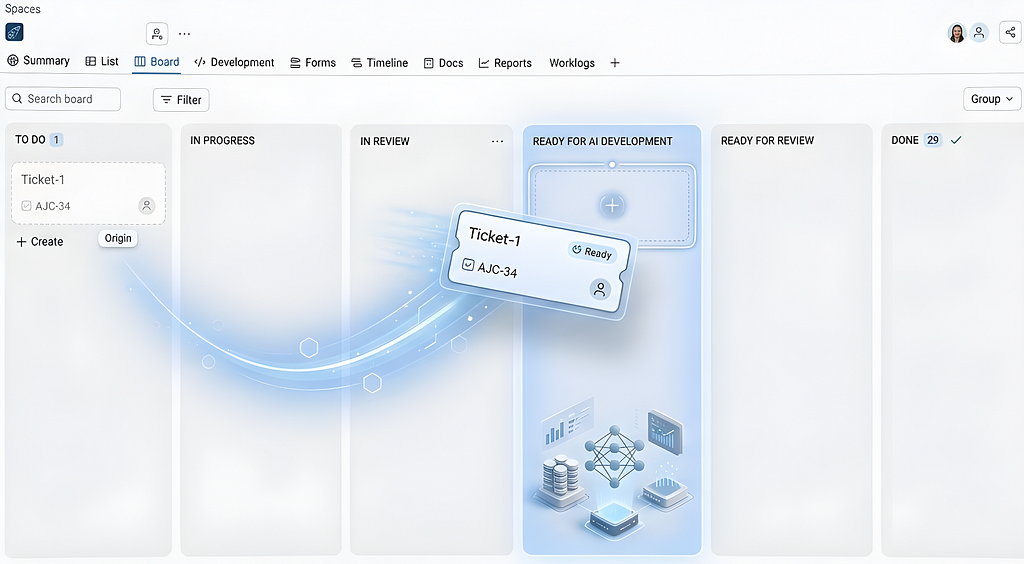
The system is triggered the moment a ticket’s status changes to “Ready for AI development.” From there, it runs through four stages with no human involvement:
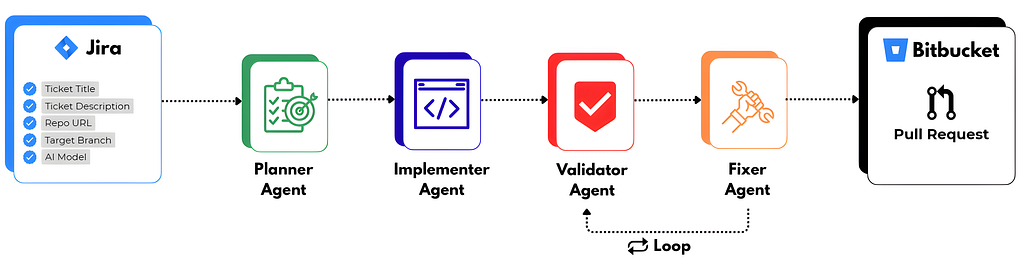
Stage 1: Planning
Before any code gets written, the codebase is explored and a plan is produced; a chosen approach, a step-by-step breakdown of the actual changes, the risks worth watching for, and a set of specific, checkable acceptance criteria derived from the ticket itself. This last part matters more than it sounds: it’s what turns a vague ticket description into something a machine can later verify objectively, rather than just eyeballing.
Stage 2: Implementation
A separate AI agent instance takes the plan and actually writes the real code. Once the change is complete, it commits the result to a dedicated branch.
Stage 3: Independent Validation
This is the stage we think does the most real work. A separate process, with no visibility into why the implementer made the choices it made, writes real, executable tests against the plan’s acceptance criteria and runs them against the actual code — for UI-facing changes, that means driving a real browser through real clicks and checking real resulting state, not reading the code and assuming it works.
Stage 4: Targeted fixing (if needed)
If validation rejects something, a narrow-mandate stage fixes only what was flagged, no unrelated cleanup, no redesigning the approach. Then the result goes back through validation again. This loop is bounded to a fixed number of rounds, so a genuinely stuck ticket fails loudly instead of burning resources forever.
Once everything passes, a pull request opens automatically, the ticket updates, and whoever filed it gets notified. A human still makes the final call on merging. The pipeline’s job is to get a reviewable result in front of them, not to remove people from the loop entirely.
2. Putting It to the Test
To evaluate whether this system provided genuine leverage we benchmarked it against a standard developer using AI workflow.
The Challenge: Build a Kanban board feature with drag-and-drop columns, card re-ordering, and persistent state updates.
We compared two approaches:
- Fully Automated Pipeline: Jira ticket trigger -> Autonomous multi-agent pipeline -> Bitbucket PR.
- Interactive Developer Session: A developer using an in-editor AI agent (Claude Code / Cursor) manually using the same prompts for planning, implementation, validation, fixing step-by-step.
For the fully automated side, we didn’t stop at running it once. We ran the exact same pipeline, against the exact same ticket, twice, once with Claude Sonnet 5 and once with Claude Haiku 4.5. We did this specifically to see what actually changes when you swap the model underneath an otherwise identical process. For the interactive session, we used Claude Sonnet 5.
Here is what we found:
The Metrics Breakdown
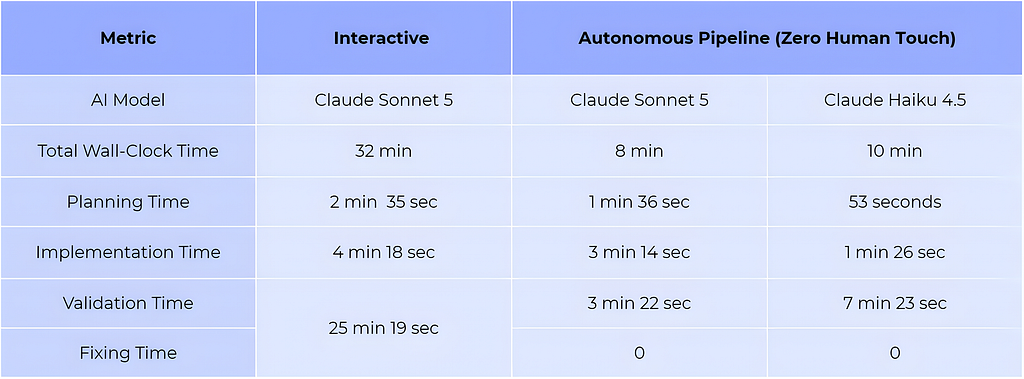
Planning and implementation were both a little slower in the interactive session, but not dramatically.
Then validation happens, and the whole comparison changes shape. The interactive session spent more time on validating and fixing than on all other steps combined, by a wide margin. Both automated runs, meanwhile, finished checking their own work faster than the interactive session finished writing code in the first place.
Both approaches produced code that worked. Neither one was actually broken against the stated requirements. But the way we found the rough edges differed.
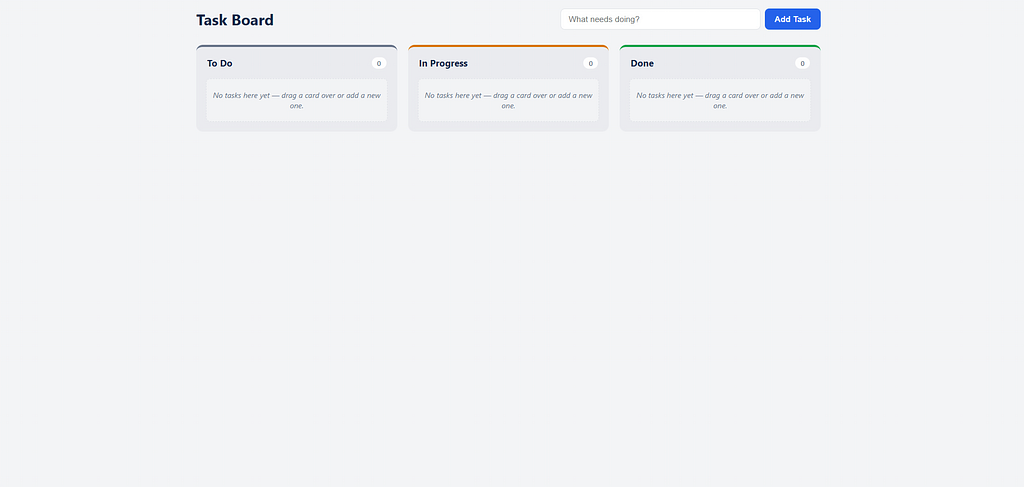
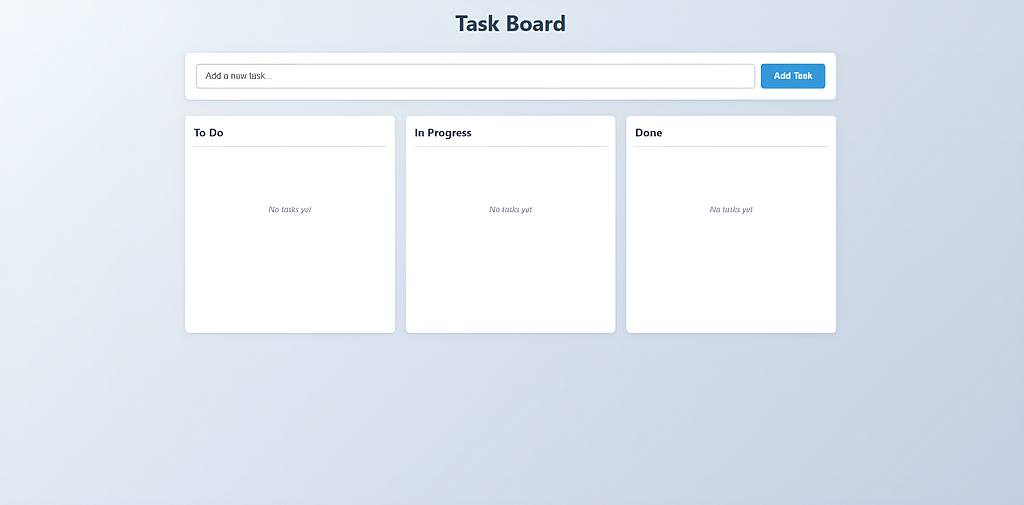
Before getting into what we found, here’s what each of the three actually produced:
The automated pipeline run (Claude Sonnet 5)
The automated pipeline run (Claude Haiku 4.5)
The interactive (editor-driven) implementation
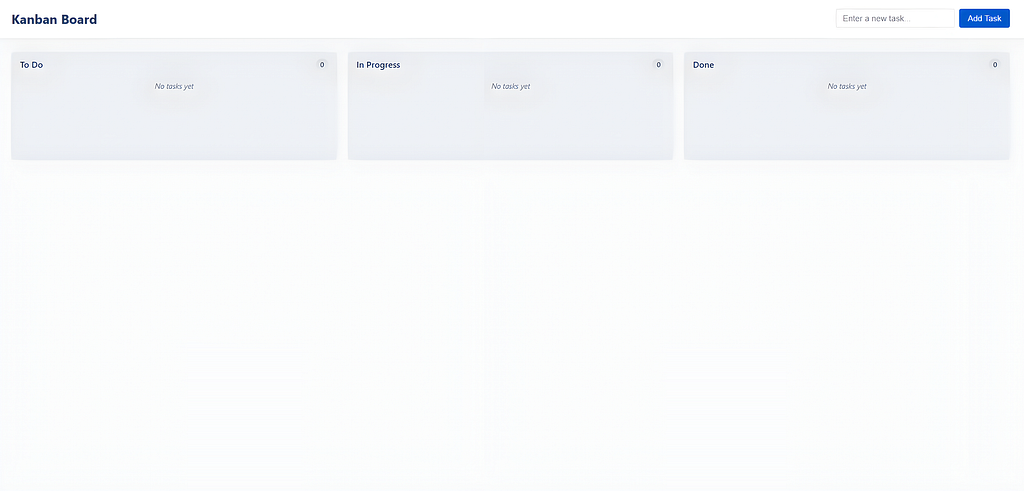
At a glance, all three look like an usable Kanban board, three labeled columns, task cards, the basic shape of the thing is right across the board. The differences only show up once you actually start using them.
1. The Automated Pipeline Run (Claude Haiku 4.5)
Sticky Hover State:
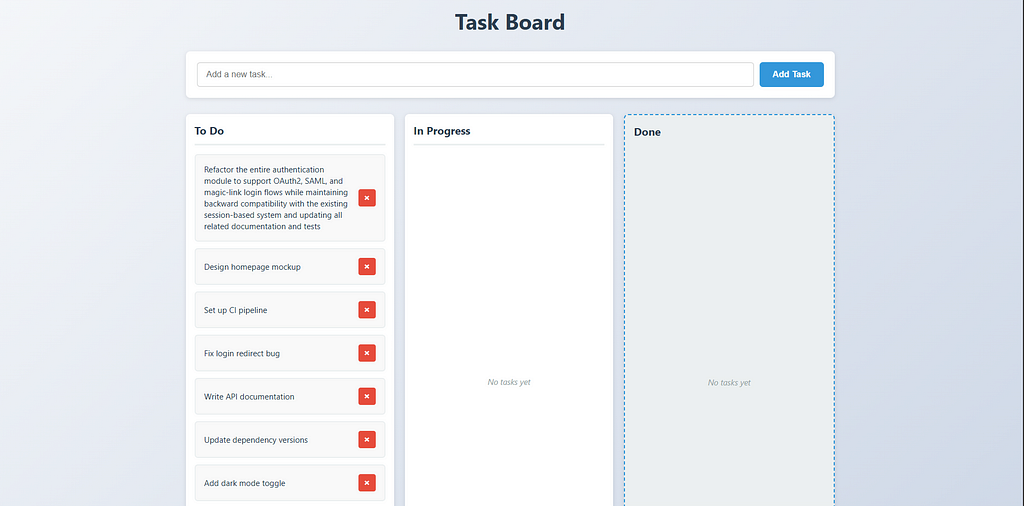
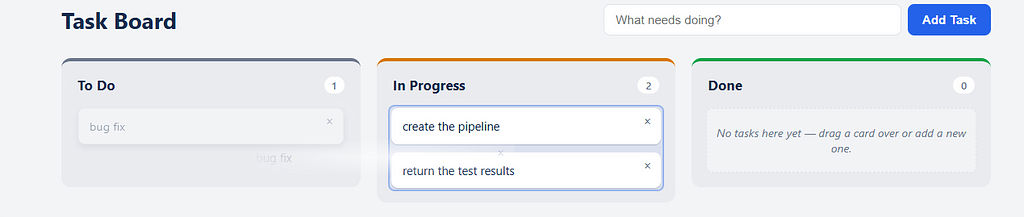
Columns would sometimes stay looking hovered or selected after the cursor had already moved to a different one, occasionally the original column and the new target both appeared highlighted at once as i was moving tickets around which you can see below:
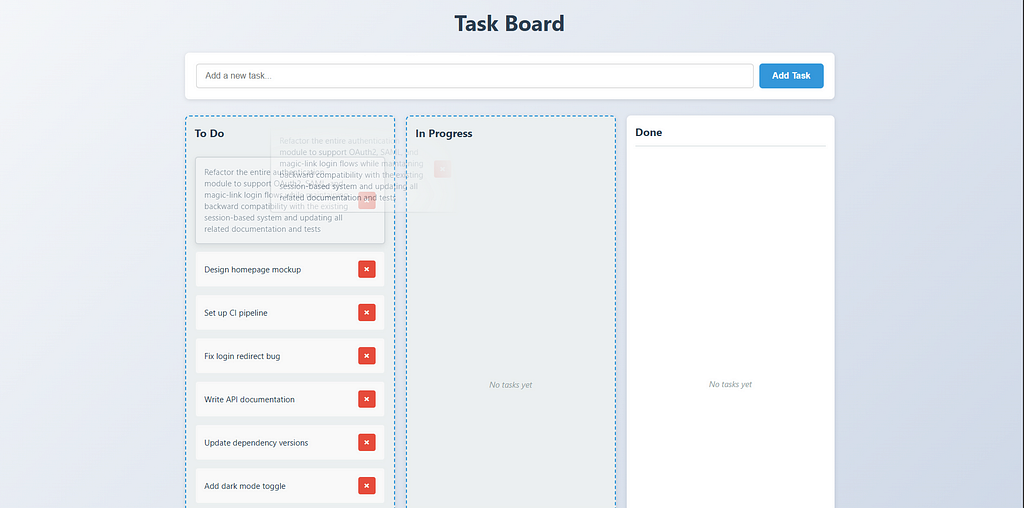
The likely cause: a hover/active class was probably being toggled on mouse-enter but not reliably cleared on mouse-leave.
Layout Bug Under Load:
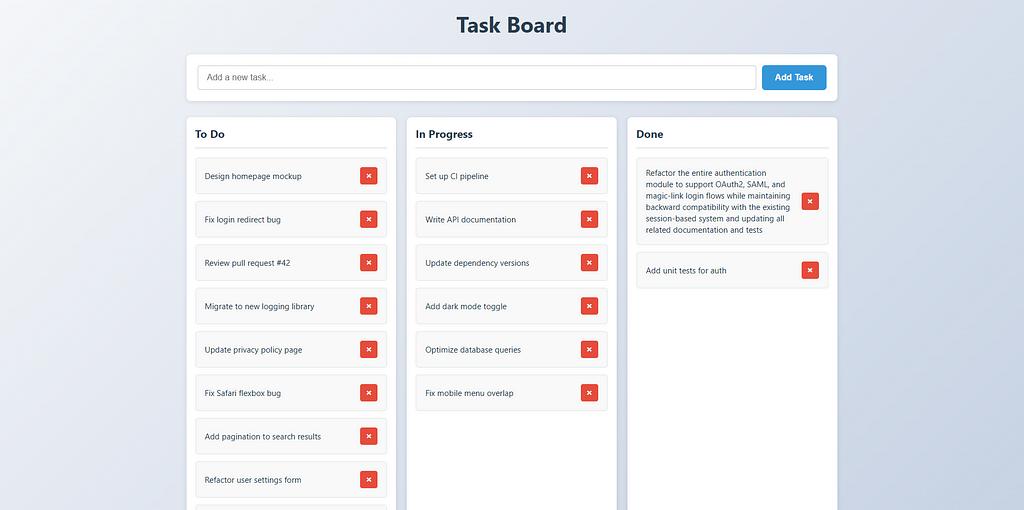
We tested this by deliberately loading one column with 15–20 tasks while keeping the other columns not so crowded to see how the layout handled being genuinely overloaded. Instead of that one column growing or scrolling on its own, all three columns resized together.
Worth being precise about which of these is actually a bug and which isn’t. The sticky hover state is a genuine glitch, unintended, and it reliably reproduces.
The column-resizing behavior is different: nothing broke or errored, the code did exactly what it was written to do. It’s better described as a design decision than a defect , sharing sizing across all three columns as the easy default. Not incorrect. Just not a good call, and worth acknowledging as a “design flaw” rather than a “bug.”
2. The Interactive Session (Human + Sonnet 5 in Editor)
Drop-Zone Area Misalignment:
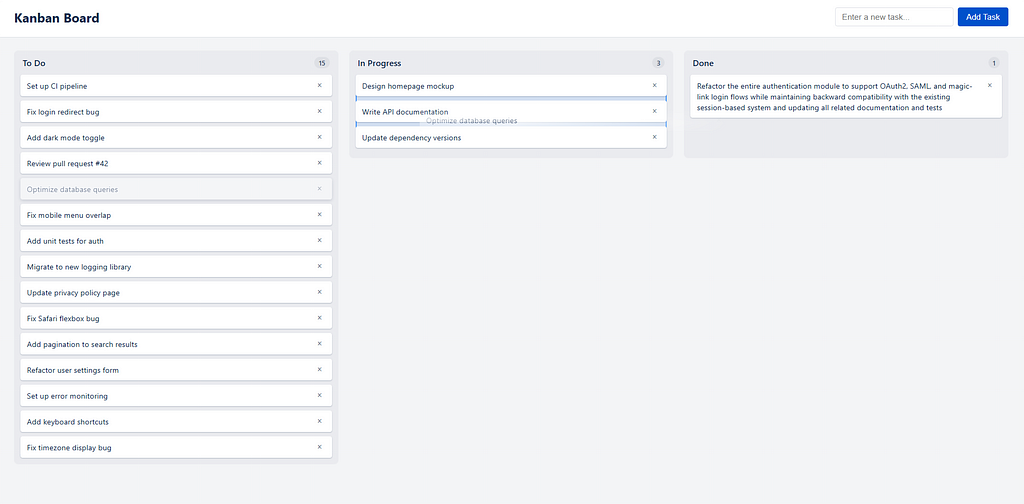
This came up simply by dragging cards around normally and paying attention to drop areas. It is a little hard to see but if you pay attention to the “In Progress” column you can see a little blue area highlighted behind it. That area shows up when user tries to drag a ticket from another column indicating the area where the ticket should be dropped to be registered as moved. The drop-zone indicator is hard to actually see once a column already has tickets in it, it’s roughly the same size as a ticket cards combined, so existing tickets end up visually covering the area that would otherwise show where a new card can be dropped.
Tight Interaction Bounds:
There’s a second criticism according to my experience with testing this version is that the blue area indicating a valid drop target was noticeably smaller than the column’s actual visible bounds as you can see in the image below:
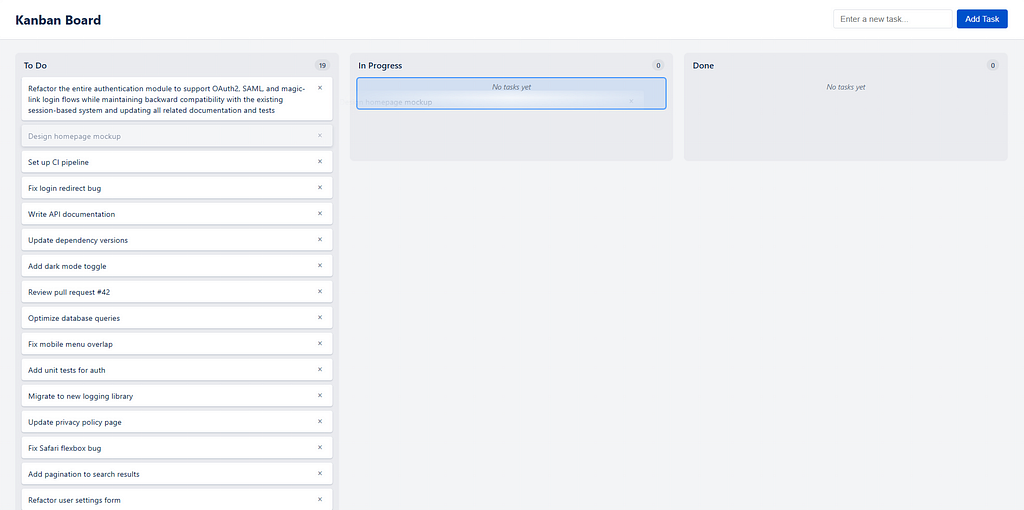
so this isn’t really a bug either , it’s a decision flaw. The better choice would have been making the entire column a valid drop target, rather than confining it to a small inner area. As built, it just makes the board more annoying to use than it needs to be, the interaction technically works, it just demands more precision from the user.
3. The Automated Pipeline Run (Claude Sonnet 5)
Clean Sweep:
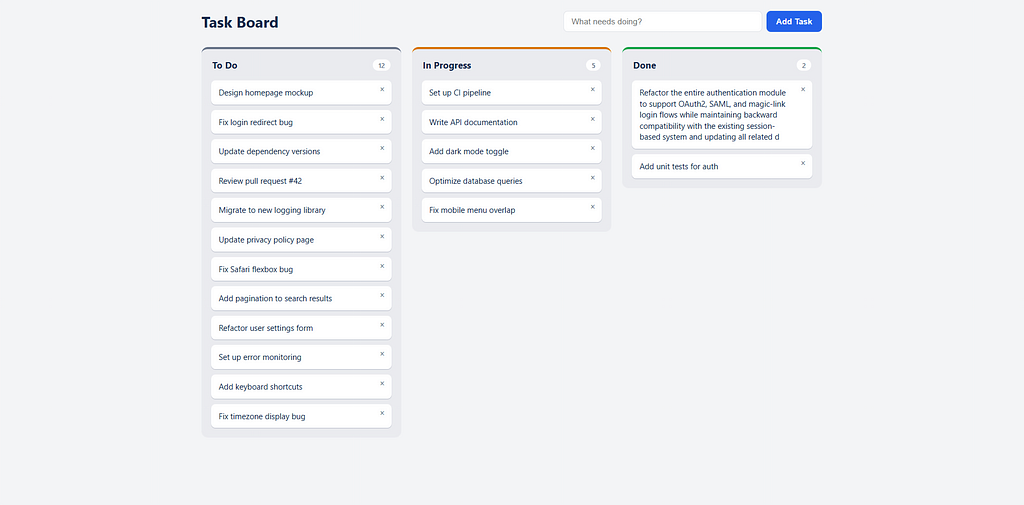
Worth stating plainly, since the other two sections were mostly about what went wrong: the Sonnet 5 automated run didn’t have any of these issues. The hover state behaved correctly across every interaction we tried. The layout held up properly under the same overloaded-column test that broke Haiku’s run. The drop-zone even though it still wasn’t the full column, was always visible and the sizing was correct.
Outcome Summary
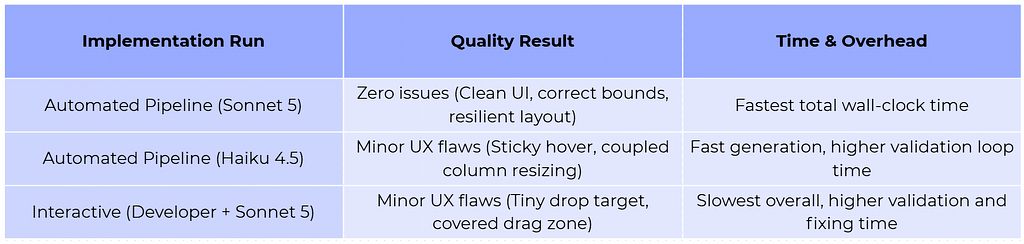
None of this was a hard task, a drag-and-drop Kanban board is a modest ask, which makes it more notable that all three approaches still ended up with something worth criticizing. Worth noting: every validator here had Playwright and a real Chromium browser, and was explicitly told to test visually, not just check for errors.
That makes the interactive session’s own drop-zone issue stand out more, despite spending by far the most time validating, that visual issue still slipped through. Still, nothing anywhere was a real, concerning bug; nothing broke or blocked normal use.
Sonnet’s automated run was the clear winner here, no issues at all, and it beat the interactive session on both quality and time. Haiku’s automated run had real issues, but purely cosmetic ones; the board stayed fully usable throughout, but it is understandable because it is a worse model than Sonnet 5.
3. Key Insights & Engineering Takeaways
Background Pipelines Shift the Engineer’s Role
Full removal of the human isn’t something we were even trying to prove is possible. It would have been easy enough to let the last stage merge its own pull request, nothing in the architecture stops that. We didn’t, on purpose.
The reason is sitting in the results section above. Haiku’s run had a hover state that stuck and a layout that resized wrong under load. None of these broke a test, none of these failed an acceptance criterion, and none of them would have stopped a fully autonomous pipeline from merging its own work and calling the ticket done. A human looking at the actual PR is still the thing that catches “this technically works but I wouldn’t ship it”, and right now, nothing in this pipeline can make that call on its own. So the merge button stays a human decision.
What the pipeline does change is where that human judgment gets spent.
- Zero active developer time before that point. The developer files a ticket and moves on to other work, the code doesn’t get written on their machine, or their clock.
- Guaranteed execution, every time. Validation and test-writing don’t depend on whoever’s holding the ticket that day, or how much else is on their plate.
- Review happens once, at the end, on a finished thing. The engineer’s first real interaction with the work is a complete, tested pull request, not a half-written diff they’re steering line by line.
The developer doesn’t disappear from this loop. They just stop being the one operating the assembly line, and start being the one deciding whether what came off it is good enough.
So: back to the question we opened with. Can filing a ticket really be the only human action required? Close to it. A human still opens the pull request and decides whether to merge and we think that’s exactly where that decision should stay. But everything before that point ran, start to finish, with nobody watching.

Related
- Related service: AGENTIC AI WORKFLOWS
- Related case study: ROOT CAUSE ANALYSIS TOOL